

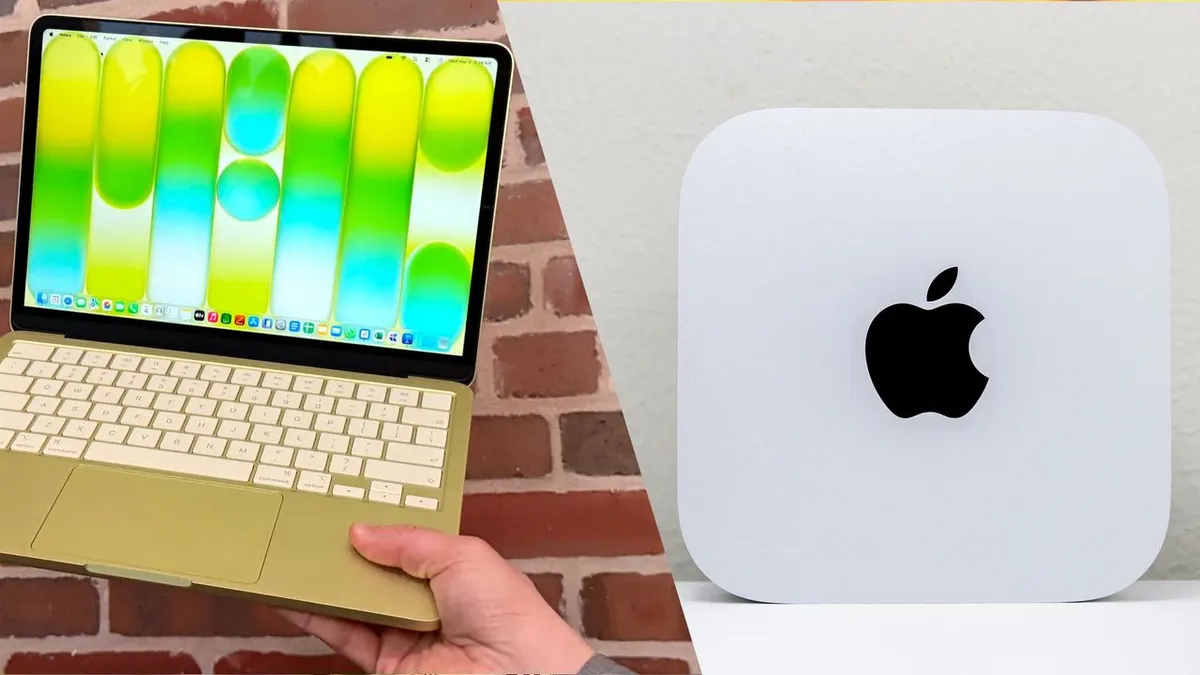
Apple offers two compelling options at $599: the portable MacBook Neo laptop and the powerful Mac mini M4 desktop. Both deliver strong performance for budget buyers, but the choice hinges on mobility needs. The MacBook Neo suits users on the go, while the Mac mini M4 excels as a stationary powerhouse, especially with existing peripherals like a monitor.
Key Specifications Comparison
| Feature | MacBook Neo | Mac mini M4 |
|---|---|---|
| Processor | A18 Pro (6-core CPU, 6-core GPU) | M4 (10-core CPU, 10-core GPU) |
| Display | 13-inch Liquid Retina (2408 x 1506) | None (supports up to three displays) |
| Memory | 8GB Unified Memory | 16GB Unified Memory |
| Storage | 256GB / 512GB SSD | 256GB to 2TB SSD |
| Ports | 2 x USB-C (1x USB 2.0), 1 x 3.5mm headphone jack | 3 x Thunderbolt 4, 2 x USB-C, 1 x HDMI, 1 x Ethernet |
| Battery Life | Up to 16 hours | N/A |
| Weight | 2.7 pounds | 1.5 pounds |
| Dimensions | 11.71 x 8.12 x 0.50 inches | 5 x 5 x 2 inches |
Design and Portability
The MacBook Neo features a fanless, ultra-thin aluminum chassis with rounded corners, echoing premium MacBook Air aesthetics. Available in Silver, Blush pink, Indigo blue, or Citrus yellow, it weighs 2.7 pounds for easy backpack carry. Ports include two USB-C (one USB 2.0) and a headphone jack on the left side. The keyboard offers 1mm travel but lacks backlighting on base models; Touch ID requires a $100 upgrade. A mechanical trackpad replaces Force Touch.
In contrast, the Mac mini M4 boasts Apple’s smallest desktop design at 1.5 pounds. It includes front USB-C and headphone ports, plus rear Thunderbolt 4 (x3), HDMI, Ethernet, and power. A compact 20W charger powers the Neo via USB-C, prioritizing the rear USB 3 port for displays or SSDs.
Performance Breakdown
| Benchmark | MacBook Neo | Mac mini M4 |
|---|---|---|
| Geekbench (single/multi-core) | 3535/8920 | 3838/14838 |
| Handbrake (min:sec) | 9:57 | 4:42 |
Lab tests reveal comparable single-core speeds for quick tasks like app launches. The Mac mini M4 dominates multi-core workloads, ideal for video editing and multitasking, thanks to its desktop M4 chip and 16GB RAM standard. The Neo’s 8GB RAM falters beyond 20 browser tabs, causing slowdowns. Its fanless design ensures silence but triggers throttling during prolonged intensive use, unlike the mini’s quiet fan for sustained peaks.
Display and Connectivity
The MacBook Neo’s 13-inch Retina display (2408 x 1506, 219 ppi, 500 nits) shines indoors with glossy finish and 480 nits HDR brightness. Color coverage hits 110% sRGB and 78.6% DCI-P3 (Delta-E 0.22). It supports one external 60Hz display via the high-speed USB-C port.
| Display Metric | MacBook Neo |
|---|---|
| Brightness (nits) | 480 (HDR) |
| Color (sRGB/DCI-P3) | 110%/78.6% |
| Accuracy (Delta-E) | 0.22 |
The Mac mini M4 drives up to three displays: two at 6K/60Hz and one at 5K/60Hz via Thunderbolt, or 8K/60Hz single. HDMI supports 4K/60Hz, enabling multi-monitor productivity setups.
Graphics and Gaming
Both support ray tracing and mesh shading. The Mac mini M4 handles higher native settings, while the Neo uses MetalFX upscaling.
| Game | Resolution/Settings | FPS (Avg) |
|---|---|---|
| Hollow Knight: Silksong | 2816 x 1762 / Native High | 60 (Locked) |
| Sneaky Sasquatch | 2816 x 1762 / Native Arcade | 60 (Locked) |
| Resident Evil 4 Remake | 1080p / Low MetalFX | 40-45 |
| Oceanhorn 3 | 1408 x 881 / Default | 45-60 |
| Cyberpunk 2077 | 720p / Low MetalFX | 30-45 |
The Neo excels in iOS ports like Resident Evil 4 but throttles in Cyberpunk after 20 minutes due to fanless design and 8GB RAM. The mini sustains performance in extended sessions with its fan and extra resources.
Final Verdict
Opt for the MacBook Neo for portability—perfect for students and travelers needing an all-in-one with superior budget laptop display. Choose the Mac mini M4 for desktop power, multitasking, and multi-display setups if staying stationary. Both ease the switch to macOS at $599 (education pricing at $499).
